How to Prevent Duplicate CRM Contacts: A Practical Guide
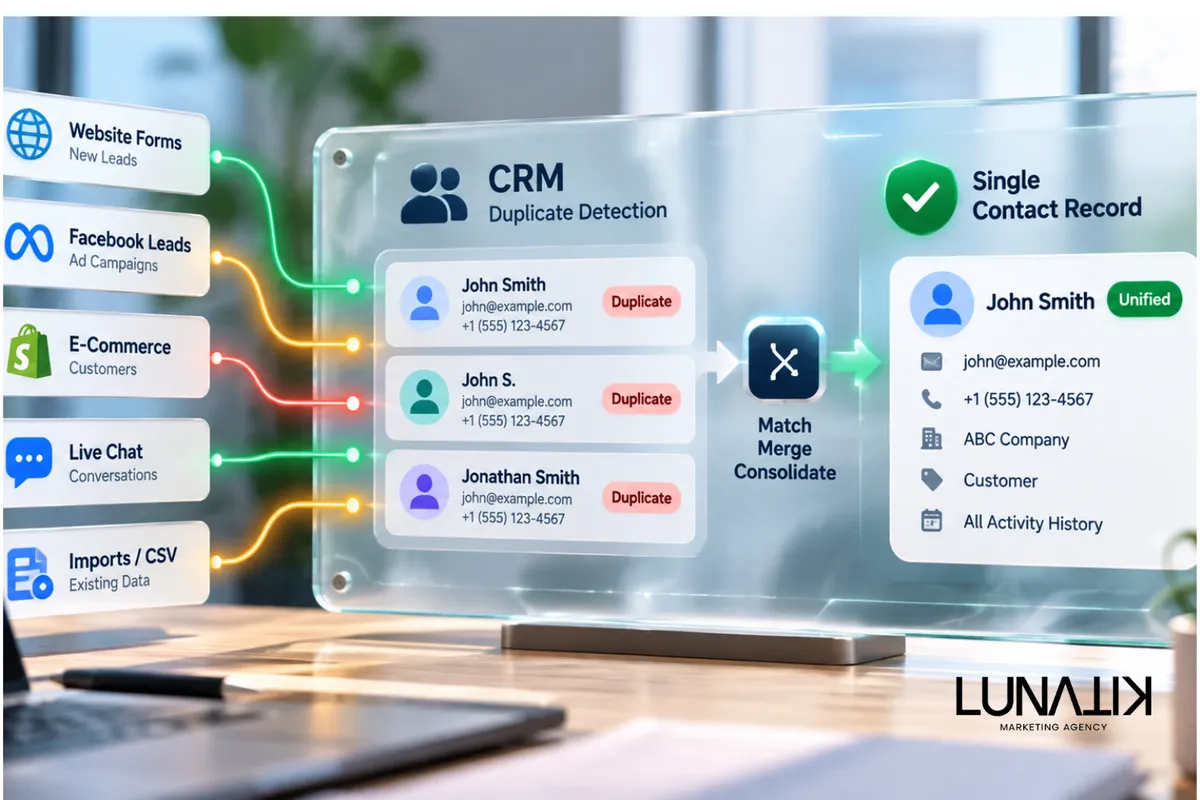
To prevent duplicate contacts in a CRM, implement a prevention-first process that combines unique identifiers, clear data-entry standards, intelligent matching rules, tested merge workflows, and ongoing monitoring. Establish consistent rules for collecting and validating contact information, such as email addresses and phone numbers, to identify potential duplicates before new records are created. Configure automated checks where possible, train team members to follow standardized data-entry procedures, and regularly review existing records to catch inconsistencies. These practices help maintain accurate customer profiles, preserve activity history, improve reporting reliability, and ensure your team has a clean, organized, and trustworthy CRM database.
Prevention-First Framework: Why Start Before Cleaning
Duplicate records usually appear when capture points, integrations, or manual entry don’t share the same identifying rules. Fixing duplicates after they exist is costly and error-prone; preventing them preserves a single contact timeline, reduces repeated outreach, and keeps reporting accurate. This prevention-first approach aligns with E-Commerce & Data Solutions because it treats data quality as a system—capture, validation, matching, and review—rather than a one-off cleanup task.
Core Elements: Unique Identifiers And Matching Rules
Choose The Right Unique Identifiers
Decision: decide which field(s) act as the primary identity for contacts. Options include email address, phone number, external customer ID from commerce platforms, or a combination. Tradeoffs: single-field IDs are simple but brittle (people change emails); composite IDs reduce false merges but require consistent capture across systems.
Design Contact Matching Rules
Matching rules determine when two records are treated as the same person. Use deterministic matches (exact email or external ID) for automatic merges, and probabilistic or fuzzy matching for suggested merges. Important considerations:
Set thresholds for fuzzy matches to balance false positives and false negatives.
Use field weights—e.g., email > phone > name—to prioritize reliable identifiers.
Log matching decisions so reviewers can audit why records were merged or suggested.
Capture And Entry Standards
Preventing duplicate CRM contacts requires consistent data at the point of entry. Practical steps:
Create controlled web forms with validation (email format, phone format) and dedupe checks before submission.
Standardize names and company fields with clear guidelines and dropdowns where possible.
Train sales and support teams on single-record updates versus creating new contacts.
Automated Capture, Integrations, And Routing
Where duplicates often appear is between tools: web forms, e-commerce platforms, live chat, ad leads, and sales imports. Implementation choices matter: choose integration patterns that preserve or map external IDs back into the CRM so records are linked instead of duplicated. When using middleware or native connectors, ensure they respect your matching rules and perform upserts instead of blind inserts.
Merge Review Workflows And Human Oversight
Not all matches should auto-merge. Create a merge workflow that separates:
Auto-merge for deterministic matches (exact external ID or email verified by domain logic).
Suggested merges that require a human reviewer when fuzzy matching confidence is medium.
Protected records that never auto-merge (high-value accounts or legal contacts) without explicit approval.
Also define who can merge, what fields are preserved, and how activity timelines are consolidated. Keep an audit trail so merges can be reversed if needed.
Ongoing Monitoring, Reporting, And Alarm Rules
Prevention is ongoing. Build simple reports and alerts that surface duplicate patterns and integration failures before they affect operations. Useful checks include:
Weekly counts of records with identical emails, phones, or external IDs.
Rate of new records created per source; sudden spikes often indicate a broken connector or form issue.
Percentage of contacts with missing primary identifier fields.
Automate notifications to data stewards when thresholds are crossed so fixes happen quickly, not after a quarterly audit.
Data Hygiene Checklist
Use this checklist to put prevention into practice. Assign owners and frequencies for each item:
Inventory capture points: list forms, integrations, imports, and manual entry locations (owner: integrations lead; frequency: quarterly).
Define primary identity fields and fallback composite keys (owner: CRM admin; frequency: designed once, reviewed annually).
Implement front-end validation on forms and block submissions missing required identifiers (owner: web/commerce dev; frequency: immediate).
Configure CRM matching rules: deterministic auto-merge, fuzzy suggestions, and protected records (owner: CRM admin; frequency: initial + iterate).
Create reviewer queue for suggested merges with merge policies and rollback steps (owner: data steward; frequency: ongoing).
Map and preserve external IDs from e-commerce, billing, and support tools during syncs (owner: integrations lead; frequency: immediate).
Schedule deduplication audits and monitor alerts for spikes in record creation (owner: operations; frequency: weekly/monthly).
Document data entry standards and train teams on the impact of duplicate leads and record merging (owner: operations/training; frequency: onboarding + quarterly refresh).
Apply the checklist and revisit the items after any platform change—new ad integrations, form changes, or commerce updates often introduce duplicate patterns.
For more on turning these steps into repeatable workflows, see this practical take on the AI Marketing Workflow which explains how automation and human review work together in a lead system.
FAQ
How Often Should I Run Deduplication?
Prevention reduces the need for mass dedupe, but schedule targeted deduplication monthly or after any major integration change. Weekly reports on matching anomalies are helpful for early detection.
Which Fields Should I Use For Automatic Merges?
Prefer deterministic fields: verified external customer ID or validated email. Use phone numbers cautiously—formatting and number sharing can create false positives.
Will Fuzzy Matching Cause Bad Merges?
Fuzzy matching can yield false positives if thresholds are too low. Use it for suggested merges with human review, and log confidence scores so reviewers understand why a suggestion appeared.
How Do Duplicates Affect Reporting?
Duplicates split activity history, inflate record counts, and make conversion metrics unreliable. Preventing duplicates maintains accurate attribution and cleaner sales handoffs.
Plan For Implementation
Start with an inventory and a short pilot: pick one data source (e.g., web leads), implement validation and matching rules, and run the merge-review process for 30–60 days. Measure false-positive and false-negative rates on suggested merges, adjust weights, then roll out across other capture points. Assign clear owners for exceptions and documentation so the system remains maintainable as teams and tools change.
Assessment And Next Steps
If your CRM currently has many duplicates, prioritize fixing connectors and mapping external IDs before bulk merging. Bulk merges without fixing capture or integration patterns usually result in repeat duplicates. Treat deduplication as a systems problem: capture, match, review, monitor.
CRM Data Systems Review
We help teams establish clear identity rules, choose effective matching strategies, and implement safe merge workflows so duplicate contacts no longer fragment sales and marketing data. At Lunatik Marketing Agency, we focus on aligning data capture, intelligent matching, and automation to keep your CRM organized, accurate, and reliable. By identifying common sources of duplication, standardizing data-entry practices, and improving integrations between platforms, businesses can reduce manual cleanup and maintain consistent customer records across their systems. If you need a practical assessment of where duplicates originate and a prioritized remediation plan, we can coordinate CRM audits and integration reviews to strengthen data quality, improve reporting accuracy, and establish your CRM as a reliable single source of truth.